From Dots and Dashes to Digital Privacy
28/01/2026
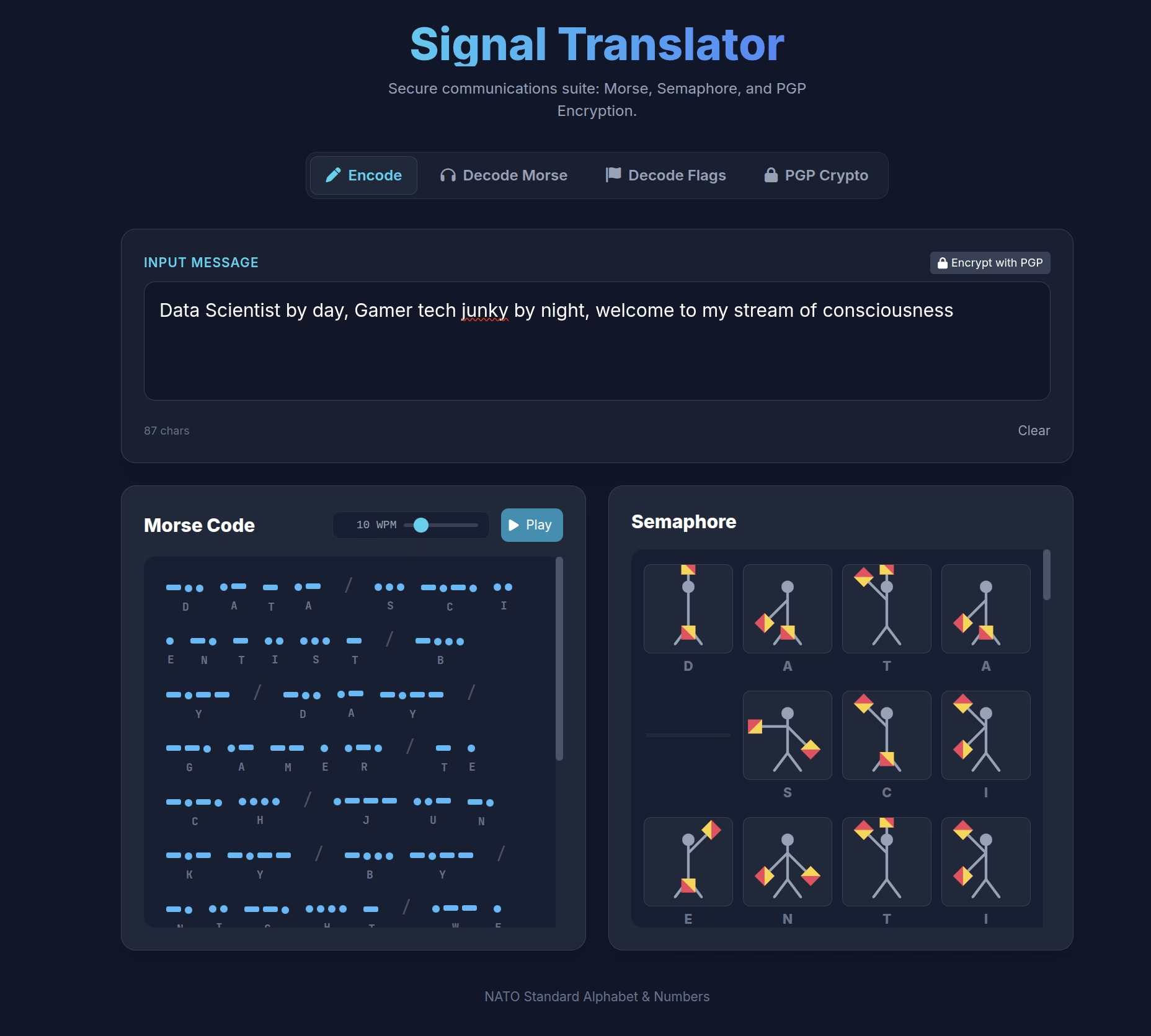

The Evolution of the Signal Translator
This started off as a bit of a joke; a Retro solution, on a modern day platform. Morse code and Semaphore flags were the original SMS, and I was looking for an easy way to make them usable today.
But what if we could bridge the gap between 19th-century signaling and 21st-century cryptography? That that’s where the evolution and development of the Signal Translator, a web application that has grown from a simple hack to write and decode Morse code, into a comprehensive suite for secure, analog-digital communication. 🙂
The Core Functionality: What Does It Do?
Signal Translator is translation and encryption engine. It speaks three languages fluently:
- Morse Code: The classic language of dots and dashes. The app doesn’t just show you the text; it performs it. You can see the visual representation and hear the audio playback with accurate timing.
- Semaphore: The visual language of the sea. The app dynamically generates a flagman who positions his arms to spell out your message in real-time.
- PGP Encryption: The modern standard for privacy. The app includes a full OpenPGP implementation, allowing you to generate keys, encrypt messages, and decrypt secrets entirely within your browser.
How It Grew: A Developer’s Diary
The app started with a simple premise: “Make a page that translates words into Semaphore and Morse code.”
Phase 1: The Visualiser
The first iteration was a straightforward encoder. You typed text, and the screen filled with dots, dashes, and flag icons. Then added a Web Audio API oscillator so users could hear the Morse code they were typing.
Fun, but strictly one-way!
What if the intended audience doesn’t know Morse Code?
Phase 2: The Two-Way Street
Communication requires listening as well as speaking. so Decode Tabs were born for both languages.
- For Semaphore: Built a visual keyboard where users can click the flag positions they see to reconstruct a message.
- For Morse: Added a text parser for manual entry (
... --- ...).
Phase 3: The “Ear” (Audio Analysis)
The Audio Listener was the biggest technical leap (and it’s still a working progress, to some extent). I considered that a user would have to write down the received message, if sent via audio, and then entered into the decoder… who has time for that ;p
I didn’t want users to just type dots and dashes; I wanted them to be able to hold their phone up to a radio or a friend whistling and have the app decode it live! (When I say user, I mean me)
This involved building a real-time audio visualiser, and a timing algorithm I found complex. Accounting for the “human element”; variances in speed, background noise, and rhythm. I added Auto-Calibration to filter out background noise, and a dynamic speed slider (WPM) to adjust the listening window for dots versus dashes.(still trying to perfect this)
Phase 4: The Security Layer (PGP)
So the thing about flashing lights, sound, and a fella waving flags about – other people can see them, ands if they have access to this app, they could decode it :p
To break this line of sight, and to drown out the noise, I researched if an old friend could help, and found it not too much of a challenge to integrate PGP (Pretty Good Privacy).
- Key Generation: Users can create their own public/private key pairs right in the app.(this was the most challenging aspect of adding PGP, loading the libraries correctly took a while)
- The Case-Sensitivity Problem: PGP text is case-sensitive, but Morse code isn’t. If you transmit PGP code via Morse, you lose the capitalisation data, breaking the encryption.
- The Base32 Solution: We implemented a Base32 encoder/decoder. This converts the encrypted PGP block into a string of uppercase letters and numbers—perfect for safe transmission over Morse or Semaphore! It’s like someone had solved this challenge already. 🙂
How to Use It: A Spy’s Guide
Here is a workflow for sending a truly secure message using the app:
Step 1: Encrypt
- Go to the PGP Crypto tab
- Enter your secret message (“Imagination not intelligence made us human”)
- Paste your recipient’s Public Key and click Encrypt
- Click “Base32 Encode (Morse Safe)” This makes the secure message safe for analog transmission
Step 2: Transmit
- Click “Transmit via Signal”. This automatically moves your secure code to the Encode tab
- Use the Morse Play button to broadcast the audio, or flash the Semaphore signals to your recipient
Step 3: Receive & Decrypt
- The recipient opens the Decode Morse tab and hits Start Listening
- The app listens to your audio and decodes the Base32 string
- They click “Decrypt as PGP”, which sends the text to the crypto tab
- They click “Base32 Decode” to restore the PGP block, enter their Private Key, and reveal: “Imagination not intelligence made us human”
Conclusion
The Signal Translator is more than just a web app; it’s a bridge between eras. It respects the history of telecommunication while applying the mathematical rigour of modern privacy. Whether you are a scout learning flags, a ham radio enthusiast, or just someone who loves the idea of sending secret codes, this tool is for you 🙂
What Next?
I’m looking to investigate if I can transmit the Morse Code via a visual medium, using the torch on a mobile. I suspect the light won’t be too hard, it’ll be the camera on the receivers device being able to distinguish the flashing dots and dashes.
I’m considering another level of encryption, within the app. The date time stamp of the first message within the session will create a seed, used to generate stronger encryption. Matey’s app will see when the first message was sent, so have the seed to generate the same key-pair – thinking they could be used for the “session”, or have them expire after time, or count of messages.
Let’s see where this goes