Planetary Formation Simulator
26/10/2025

Ever considered how planets are formed from accretion disks around stars?
Me too!
This git repo (AmbiguousError/accretion) is a bit of a journey that I’ve been playing off and on, over several months, details below how to recreate it locally, here’s a summary of the different webpages I’ve created from this thought experiment 🙂
Note: these models seem to work best in Chrome, and were designed with mobile first mindset
First iteration: Planetary Formation Simulator
Welcome! This is an interactive physics sandbox where you can create and observe the formation of planetary systems.
Play with pulsars, blackholes, recreate the Sol system, and let them all go supernova!
How it Works:
* Use the controls in the Settings menu to define the physical properties of your new star system.
* The simulation models gravity, particle collisions, and gas drag to show how a disk of dust and gas can evolve into planets.
* Enable N-Body Physics to make every particle attract every other particle, allowing for realistic clumping and moon formation.
* Create chaotic Binary or Trinary star systems and see how they affect planet development.
I then played with the hypothesis of Jupiter’s influence on the inner planets: Solar System Evolution Simulator
This is an N-body physics simulation that models how our solar system might have evolved differently.
How it Works:
* Gravity Engine: Every body is constantly pulling on every other body, creating dynamic, chaotic orbits.
* The Snow Line: Asteroids outside the Sun’s “snow line” start as icy; those inside start as rocky.
* Visual Scaling: For clarity, the on-screen sizes of the planets are exaggerated. The simulation’s physics are driven by their actual mass (e.g., Sun: 1000, Jupiter: 318), not their visual size.
Architect the System:
* Planet Toggles: Use check boxes to add or remove planets and see how the system’s stability changes.
* Asteroid Slider: Control the number of asteroids to balance performance and detail.
* Jupiter’s Orbit & Heat: Adjust Jupiter’s starting position and activate its “heat bubble” to see how it shapes the system.
Design your own solar system and run experiments to see what happens!
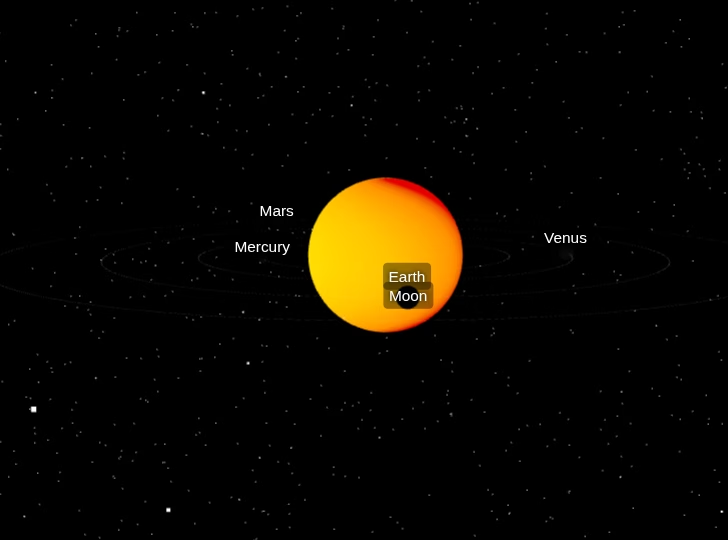
My favourite in this experiment (although I still love playing with the accretion model) is Welcome to the Solar CME Simulator
I particularly like the planet ‘aurora’ when the CME radiation hits a planet, and the planet orbits, especially the Moon circling the Earth 🙂
This is an interactive 3D visualization of a Coronal Mass Ejection (CME), a massive burst of plasma from the Sun.
How to Use:
* Explore: Use your mouse or touch to drag, pan, and zoom to view the inner solar system.
* Select Flare Class: Choose the intensity of the solar flare (C, M, or X-Class).
* Launch CME: Click the “Launch CME” button to trigger an eruption from a random hotspot on the Sun.
* Observe: Watch as the CME travels through space. If it hits Earth, it may trigger an aurora effect.
* Limitations of this Simulation:
* This is an educational tool, not a scientifically precise model. Key simplifications include:
* Scale & Distance: Planet sizes, distances, and CME particle sizes are not to scale.
* Speed: Orbital speeds and CME travel time are greatly accelerated for viewing purposes.
* Visuals: The CME, aurora, and planet textures are artistic representations.
& the last one is a work in progress, born from the Jupiter influence is Jupiter Accretion
Watch as a central mass, representing a young Jupiter, pulls in surrounding dust and particles through gravitational force, demonstrating the process of planetary accretion.
* This isn’t as physics centrist as the others, but I really love the shading and highlighting from the theoretical star / sun
Here’s the repo, hope it’s of interest, and that you can build something from what I’ve started :o)
Planetary Formation Simulator (Github REDAME)
This is an interactive web-based physics sandbox that allows you to simulate and observe the fascinating process of planetary formation. You can customize various parameters of a stellar system and a protoplanetary disk to see how different conditions influence the evolution of planets.
Features
Interactive Simulation: Dynamically create and observe planetary systems.
N-Body Physics: Enable N-body gravitational calculations for realistic interactions between all particles, allowing for complex clumping and even moon formation.
Customizable Stellar Systems:
* Choose between a single star (default), a pulsar, or a black hole as your central celestial body.
* Adjust the mass of the primary star.
* Create binary or trinary star systems with configurable companion masses, distances, and speeds.
Protoplanetary Disk Controls:
* Adjust the density of the initial dust disk.
* Set the initial size of dust particles.
* Control the universal gravitational constant.
* Fine-tune the initial orbital velocity of particles.
* Add comets to your simulation.
* Experiment with gas drag to see its effect on particle orbits.
Simulation Control:
* Adjust the simulation speed.
* Control the simulation quality (Theta) for N-body calculations.
* Restart the simulation with current settings.
* Reset to Defaults for all parameters.
* Load a Sol System preset.
* Trigger a Supernova (if a star is present) to observe its impact.
* Stabilize the system by disabling N-Body physics and gas drag.
* Use the eye icon button (top-left) to toggle the visibility of the on-canvas UI controls.
* Real-time Statistics: Monitor elapsed time, the mass of the largest body, and the current particle count.
* Responsive Design: The simulation canvas and UI adapt to different screen sizes.
How to Use
* Open index.html: Simply open the index.html file in your web browser.
* Start Simulation:
* Upon opening, you’ll see a landing overlay explaining the basics. Click the “Start Simulation” button to begin.
* Adjust Settings:
* Click the “Settings” button (bottom-left) to open the control panel.
* Modify parameters such as Star Type, Disk Density, Gravitational Constant, and more using the sliders and toggles.
* Changes to most parameters will immediately restart the simulation with the new settings.
* Control Simulation:
* Use the Speed slider at the bottom to adjust how fast the simulation runs.
* Click “Restart” to re-initialize the simulation with the current settings.
* “Defaults” will reset all settings to their initial values and restart.
* “Sol System” will load a pre-configured simulation resembling our solar system.
* The “Supernova” button (top-right, only available with a star) will trigger a supernova event, dispersing particles.
* The “Stabilize” button (top-right) will turn off N-Body physics and gas drag, which can help stabilize complex systems.
* Use the eye icon button (top-left) to toggle the visibility of the on-canvas UI controls.
* Observe: Watch how particles interact, coalesce, and potentially form larger bodies based on your chosen parameters.
Technical Details
This simulator is built using:
* HTML5 Canvas: For rendering the simulation.
* JavaScript: For all simulation logic, physics calculations, and UI interactions.
* Bootstrap 5: For responsive layout and styling of the user interface.
* Barnes-Hut Algorithm: (When N-Body Physics is enabled) A tree-based algorithm used to approximate gravitational forces between a large number of particles, improving performance.