F1 Circuit Procedural Grand Prix
26/01/2026
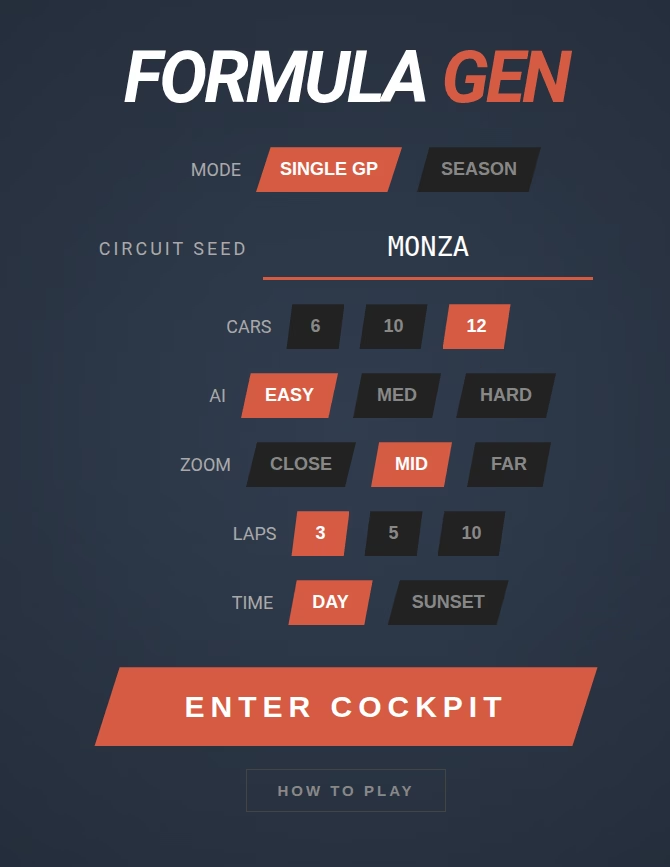

F1 Circuit is a lightweight, mobile friendly browser-based 3D racing game that features procedurally generated race tracks. Built with Three.js and Cannon-es, it offers a physics-based arcade driving experience with AI opponents, championship seasons, and customisable race parameters.
CLICK HERE TO PLAY: F1 CIRCUIT
Features
Procedural Tracks: Every race is unique based on a text seed (e.g., “MONZA”, “SPA”, “SUZUKA”).
3D Physics: Real-time vehicle dynamics including suspension travel, grip levels, and cornering forces.
Championship Season Mode: Compete in a series of 3, 5, or 10 races, accumulating points to become the season champion.
Smart AI: Opponents with configurable difficulty levels (Easy, Medium, Hard) that race competitively and avoid obstacles.
Dynamic Environments: Choose between Day or Sunset lighting conditions.
Surface Physics: Different grip and drag levels for Tarmac, Grass, and Sand Traps.
Mobile Support: Fully responsive design with on-screen touch controls.
How to Play
- Controls (Keyboard)
- W / Up Arrow: Accelerate
- Spacebar: Brake / Stop
- A / Left Arrow: Steer Left
- D / Right Arrow: Steer Right
- Spacebar (Hold while stopped): Reset Car to Track
- ESC: Pause Game
- Controls (Mobile)
- Left/Right Arrows: Steering
- GAS: Accelerate
- BRAKE: Brake / Reverse / Reset
Game Modes
1. Single GP
Enter a specific Circuit Seed (or use the default) to generate a track. Practice your lines or race against the AI in a standalone event. Ideal for testing specific track layouts.
2. Season Mode
Embark on a multi-race championship.
Tracks are randomly generated for each round.
Points are awarded for the top 6 finishers (25, 18, 15, 12, 10, 8).
Track your standing in the championship table after every race.
Configuration Options
Before entering the cockpit, you can customize the race experience:
Mode: Switch between Single GP and Season.
Circuit Seed: (Single GP only) Input up to 12 text characters to generate a unique track layout.
Races: (Season only) Set season length to 3, 5, or 10 rounds.
Cars: Select grid size: 6, 10, or 12 cars.
AI: Set opponent difficulty:
Easy: Slower top speed, cautious cornering.
Medium: Balanced competitive speed.
Hard: High top speed, aggressive cornering.
Zoom: Set default camera distance: Close, Mid, or Far (High Altitude).
Laps: Set race length to 3, 5, or 10 laps.
Time: Toggle between bright Daylight or dramatic Sunset lighting.
Technical Stack
Render Engine: Three.js
Physics Engine: Cannon-es
Language: Vanilla JavaScript (ES6 Modules)
Audio: Web Audio API (Synthesized engine sounds)
Tips
Stay on the Grey: Touching the grass reduces grip and speed. Hitting a sand trap will slow you down significantly.
Braking: Use the brakes before sharp corners to maintain the racing line. Drifting is possible but risky!
Reset: If you flip over or get stuck in a wall, come to a complete stop and hold the Spacebar (or Brake button) to reset your car to the track center.
Perspective: See more of the track when racing from a zoomed out view.