BlueSky Delete
25/10/2025
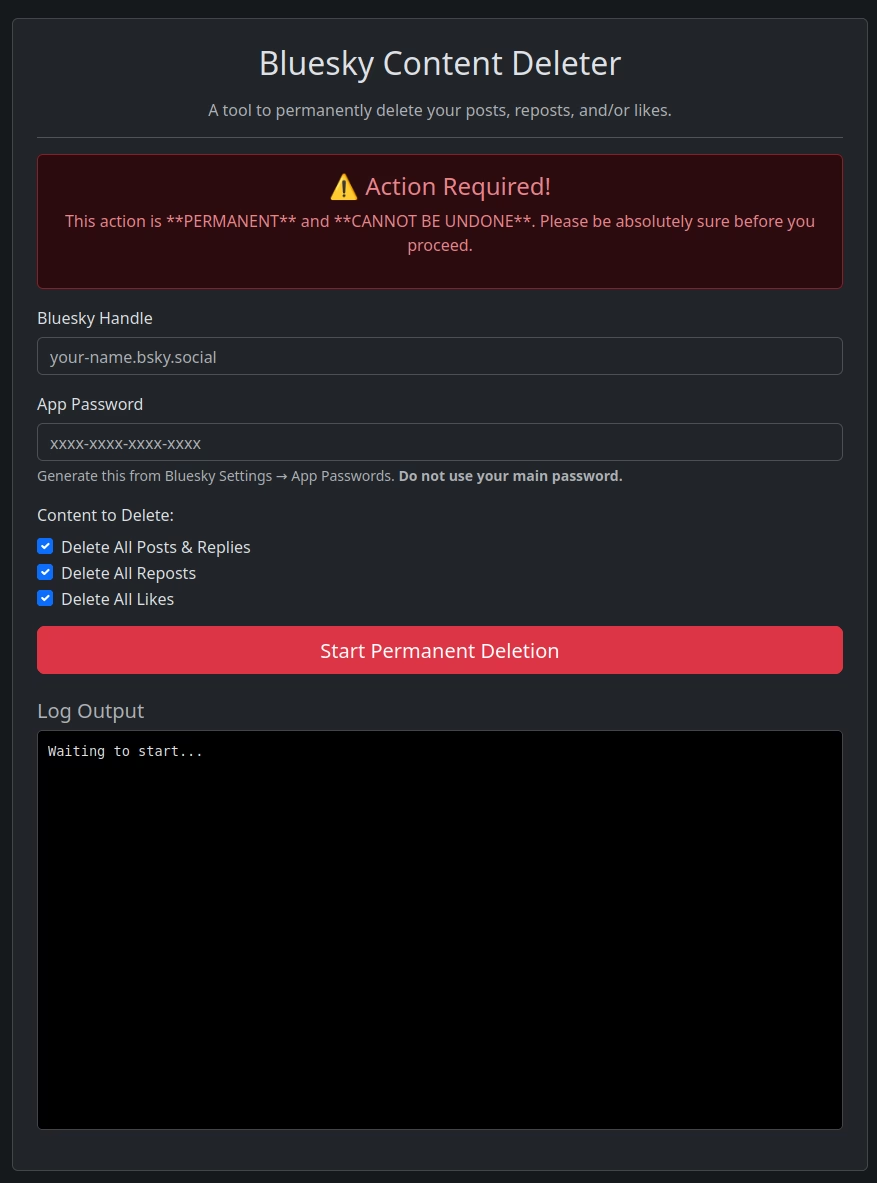

I’ve found Bluesky to be a friendly place, and a more pleasant experience than Twitter, however after witch hunts from some social groups, and following my old Reddit way of working, I find it useful not to have a post history… so I created this tool to purge ones history: Access here Bluesky Delete
Bluesky Content Deleter Web UI
This is a simple, self-contained, browser-based tool for permanently deleting your posts, replies, and likes from your Bluesky (AT Protocol) account. It provides a user-friendly interface that requires no installation or command-line knowledge.
Features
User-Friendly Interface: A clean and simple form built with Bootstrap.
Selective Deletion: Choose to delete posts & replies, likes, or both.
Runs Entirely Client-Side: All operations happen in your web browser. Your credentials are never sent anywhere except to the official Bluesky servers.
No Installation Required: Simply download the .html file and open it in your browser.
Rate-Limit Aware: Includes a built-in delay between delete requests to avoid API spam flags.
Secure: Uses Bluesky’s “App Password” feature, so you never have to enter your main account password.
⚠️ Important Warning: Irreversible Action
This action is PERMANENT and CANNOT BE UNDONE.
Once you delete your content using this tool, there is no way to recover it. Please be absolutely certain before proceeding. It is highly recommended to first request an archive of your data from Bluesky’s settings if you wish to keep a personal copy.
Use this tool at your own risk.
How to Use
Step 1: Get a Bluesky App Password
For security, this tool uses an App Password, not your main password.
Log in to the Bluesky Website.
Navigate to Settings in the left-hand menu.
Scroll down and click on App Passwords.
Click Add App Password, give it a name (e.g., deleter-tool), and copy the generated password (it will look like xxxx-xxxx-xxxx-xxxx).
Save this password immediately, as you will only be shown it once.
Step 2: Download and Open the Tool
Open the link https://ambiguouserror.github.io/BlueskyDelete/ in a modern web browser (like Google Chrome, Mozilla Firefox, or Microsoft Edge).
Step 3: Run the Deletion Process
Enter your Bluesky Handle (e.g., your-name.bsky.social).
Paste the App Password you generated in Step 1.
Use the checkboxes to select what you want to delete (Posts and/or Likes).
Click the Start Permanent Deletion button.
A confirmation pop-up will appear. You must confirm to proceed.
The process will begin, and you can monitor its progress in the Log Output box. Please be patient, as this can take a long time if you have a lot of content.
🔒 Security
This tool has been designed with security as a priority:
Client-Side Operation: All logic runs in YOUR browser. Your credentials are never sent to any server except the official Bluesky API (bsky.social) for authentication.
No Data Storage: The tool does not store, save, or log your credentials or any other data. Once you close the browser tab, everything is gone.
App Passwords: By using an App Password, you are not exposing your main account password. You can revoke the App Password in your Bluesky settings at any time to cut off access.
Transparent Code: The code is fully contained within the bluesky-deleter.html file. You can easily inspect it yourself by right-clicking the page and selecting “View Page Source” to verify its behavior.
How It Works
This tool is a single HTML file powered by modern JavaScript.
It uses the official @atproto/api JavaScript library, loaded from a trusted CDN, to communicate with the Bluesky API (AT Protocol).
When you log in, the script authenticates with the Bluesky server.
It then programmatically fetches a list of all your posts or likes. Since the API returns data in batches (“pages”), the script loops until it has collected all records.
Finally, it iterates through each record and sends a delete request, pausing briefly between each one to respect API rate limits.